LED Sign Controller & Communication Protocol
Simple commands,
Stunning LED displays!
GD500 is a communication protocol solution for displaying and controlling
LED signs with simple commands from a PC, software, or hardware (ESP32, etc.).
500
byte real-time
16
screen split
8+
built-in fonts
RS232 · Ethernet · WiFi
PACKET · It's that simple!
#{S0/F1/C1안녕하세요}#
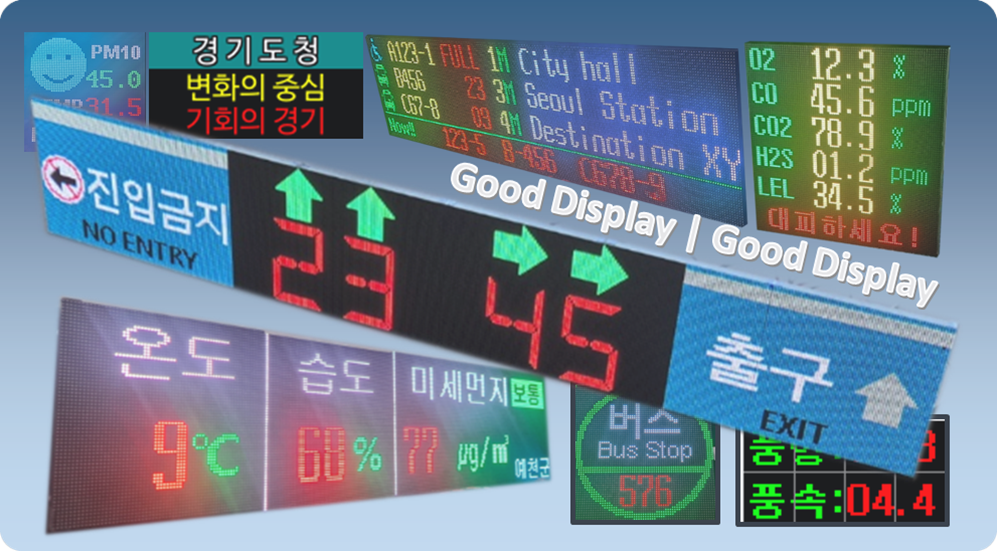
GD500 use cases
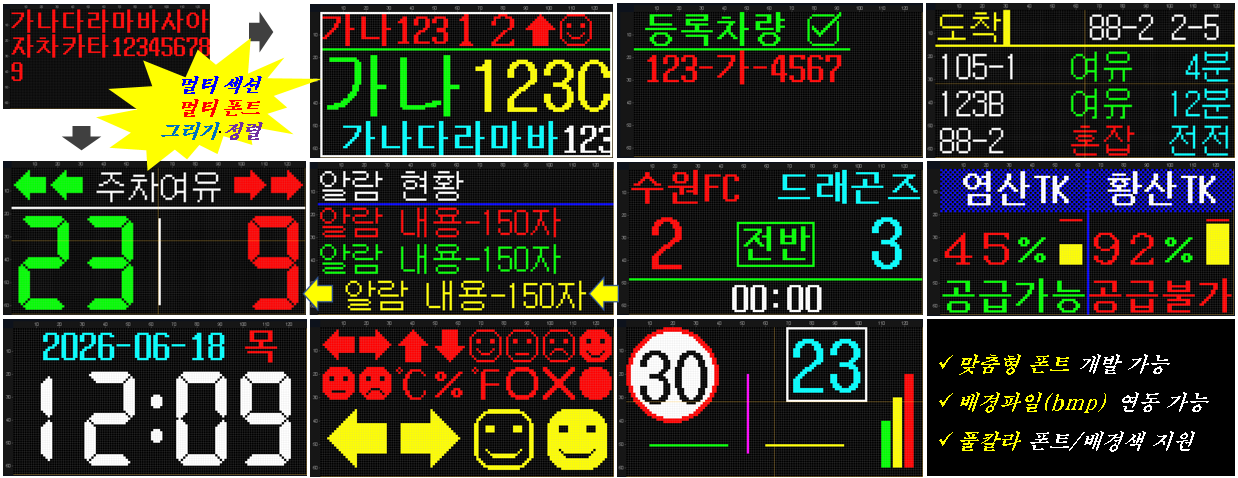
GD500-KIT-B (128x64 px) display image
GD500
- GD500 is a communication protocol and dedicated controller that lets devices and systems send standardized text packets to display and control LED signs.
- Without complex video processing, a few lines of human-readable commands display text, colors, effects, and graphics freely, smartly, and cleanly.
- GD stands for "Good Display". It can receive and process packets (single or batched) of up to 512 bytes at a time.

•
ModelsGD500a(full color), GD500b(7 colors), GD500c(custom)
•
Max resolution7 colors 4R×8C(standard) / 4R×32C(64×512px, custom), full color 4R×12C / 16R×32C(256×512px, custom)
•
CommunicationRS232/TTL, Ethernet, RS485 (option), WiFi/BLE (option), contact input (PLC/switch, option), etc.
•
LED panelsHUB75 matrix, 1/32, 1/16, 1/8, 1/4 scan
1
A simple, easy, and extensible communication protocol
2
Split the screen into up to 16 sections for detailed, refined layouts
3
A wide range of premium fonts(8+) built in, more can be added
4
Drawing(rectangles, horizontal/vertical lines, circles, dots), alignment functions, etc.
5
BMP images and contact signal input display, app integration supported
6
Custom sample packets/code and development software provided
7
Tailored, friendly technical consultation(AnyDesk remote support)
8
PLC Modbus communication and other protocol matching options on request
9
Custom firmware available (customer logo marking, OEM production)
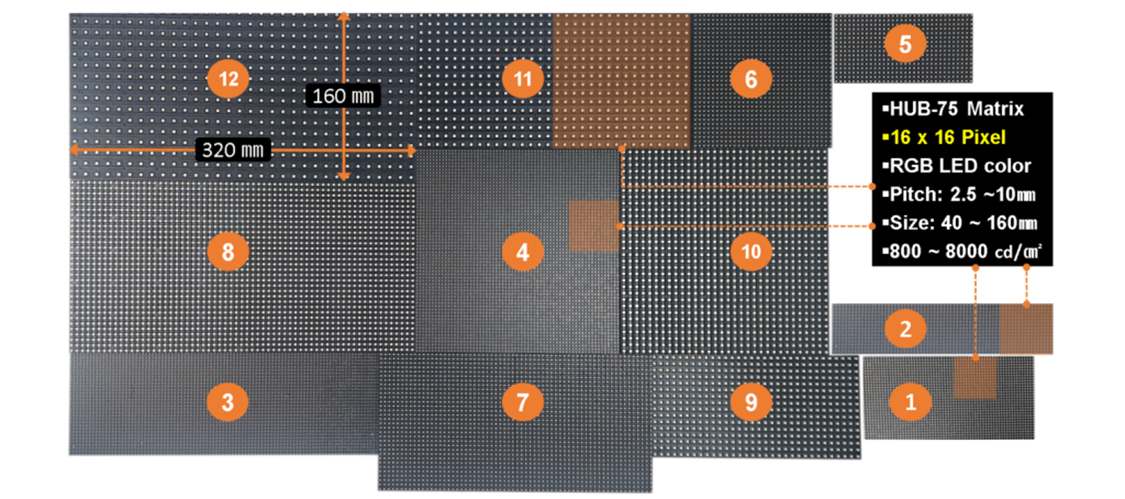
LED Panels
- GD500 works with the HUB75 LED panels below, used singly or connected together for larger displays.
- Panels with a pixel pitch smaller than 2.5㎜ or larger than 160㎜ (viewing distance 30m+) can also be used.
- Contact us and we will recommend and supply the right panels for your project.
| No. | Representative LED model (spec sheet link) | Pitch | Pixels (V x H) | Size (mm) | Scan | Brightness | Viewing distance | Power | Use |
|---|---|---|---|---|---|---|---|---|---|
| ① | LED-P2.5-2R4C-16S | 2.5 mm | 32 × 64 | 80 × 160 | 1/16 | 700 | 2 ~ 10m | 10W | Indoor |
| ② | LED-P2.5-4R8C-32S | 2.5 mm | 64 × 128 | 160 × 320 | 1/32 | 700 | 2 ~ 17m | 20W | Indoor |
| ③ | LED-P3-1R4C-16S | 3 mm | 16 × 96 | 48 × 192 | 1/16 | 700 | 3 ~ 11m | 8W | Indoor |
| ④ | LED-P3-2R6C-16S | 3 mm | 32 × 96 | 96 × 288 | 1/16 | ≥ 2200 | 3 ~ 11m | 15W | Indoor/Outdoor |
| ⑤ | LED-P3-4R4C-32S | 3 mm | 64 × 64 | 192 × 192 | 1/32 | 700 | 3 ~ 11m | 29W | Indoor |
| ⑥ | LED-P4-1R2C-8S | 4 mm | 16 × 32 | 64 × 128 | 1/8 | ≥ 6000 | 5 ~ 14m | 8W | Outdoor |
| ⑦ | LED-P4-2R2C-16S | 4 mm | 32 × 32 | 128 × 128 | 1/16 | ≥ 2200 | 5 ~ 14m | 6W | Indoor/Outdoor |
| ⑧ | LED-P4-2R4C-8S | 4 mm | 32 × 64 | 128 × 256 | 1/8 | ≥ 6000 | 5 ~ 14m | 30W | Outdoor |
| ⑨ | LED-P5-2R4C-8S | 5 mm | 32 × 64 | 160 × 320 | 1/8 | ≥ 6000 | 7 ~ 17m | 40W | Outdoor |
| ⑩ | LED-P6-1R2C-8S | 6 mm | 16 × 32 | 96 × 192 | 1/8 | ≥ 900 | 8 ~ 18m | 16W | Indoor |
| ⑪ | LED-P6-1R2C-8S-O | 6 mm | 16 × 32 | 96 × 192 | 1/8 | ≥ 6000 | 8 ~ 18m | 16W | Outdoor |
| ⑫ | LED-P6-2R2C-8S | 6 mm | 32 × 32 | 192 × 192 | 1/8 | ≥ 6000 | 8 ~ 18m | 32W | Outdoor |
| ⑬ | LED-P8-1R2C-4S | 8 mm | 16 × 32 | 128 × 256 | 1/4 | ≥ 6000 | 10 ~ 23m | 29W | Outdoor |
| ⑭ | LED-P10-1R2C-4S | 10 mm | 16 × 32 | 160 × 320 | 1/4 | ≥ 4000 | 12 ~ 25m | 35W | Outdoor |
| ⑮ | LED-T10-1R2C-4S | 10 mm | 16 × 32 | 160 × 320 | 1/4 | ≥ 8000 | 13 ~ 30m | 40W | Outdoor |
Pitch
Distance between pixels. 2.5–10mm is most common. For viewing distances over 30m (pitch 15–30mm), contact us.
Pixels
Panels are built from 16×16 pixel modules, so this value is a 'rows × columns' multiple. E.g. '2R 4C' means (2×16) × (4×16) pixels.
Size
Size of one panel, equal to "pixels × pitch".
Scan
Dynamic scan rate. Higher values increase brightness and power consumption.
Brightness
Varies widely by LED chip type, scan rate, etc. Indoor panels need 1500cd/m² or less; outdoor panels need 4000+, or 6000+ in direct sunlight. Running an outdoor panel indoors at 30% brightness or less reduces glare and power use and extends its life.
Viewing distance
(optimal viewing distance): depends on LED pitch, brightness, and font size. Larger fonts improve visibility.
Power
Maximum power draw with all LEDs lit white. Showing text only uses about 30~50% of this value.
Location
Indoor / Indoor/Outdoor / Outdoor. Outdoor panels include waterproof gaskets. Outdoor panels can be used indoors at about 30% brightness.
LED-T10
This panel uses DIP (dual in-line package) LED chips. DIP chips are brighter and more durable, and are recommended for high-brightness outdoor use.
GD500 LED Sign Communication Protocol
From packet structure to special commands — full control from this one page
Split the screen into up to 16 coordinate-based sections, each with its own font and effect.
Packets start with #{ and end with }# . Multiple packets (up to 512 bytes total) can be sent at once.
Example packet — resolution 128×64
#{S0/X000128/Y000016/F1/M0/C1가나123/F312ce}# //line 1
#{S1/X000128/Y017048/F2/M0/C2가나/C3123C}# // line 2 (large text)
#{S2/X000128/Y048064/F1/M1/C6가나다라마바/C7123456}# //line 3
#{/r(0,0,128,64,C7)/h(0,16,128,C2)}# //drawing (outline, horizontal line)
#{
Start
S0
Section 0–F
/X000128
X coord.
/Y000016
Y coord.
/A0
alignment
/F1
Font
/M0
Effect
/C1
Color
가나다123
String
}#
End
If attributes are omitted, defaults (XY: full size, A0 left align, F1 font, M0 static) apply.
E.g. sending #{S0/C1가나다123}# applies #{S0/X000125/Y000031/A0/F1/M0/C1가나다123}# automatically.
Section split
Split one screen into up to 16 areas showing different messages at once
S0(default)
S1 ~ S9
SA~SF
Alignment in section
0 Left (default)
1 Center
2 Right
3 Horizontal + vertical center
4 Justified
5 Vertical center + justified
Fonts (8+)
F0 14x14 Gulim thin
F1 16x16 Gulim (default)
F2 32x32 Gulim
F3 16x16 special characters
F4 32x32 special characters
F5 ...
Display effects
M0 Static (default)
M1 Scroll
M2 Blink
Text color
C1 Red C2 Green
C3 Yellow C4 Blue
C5 Pink C6 Cyan
C7 White C0 Black
Full color (adds text colors A–M, a–s)
S0 ~ S9, SA ~ SF
Up to 16 sections.
Position each section in pixels, allowing for each font's size and margins
/X aaabbb
Horizontal start (3 digits) + end (3 digits). E.g.
/X000127 = 0~127px/Y aaabbb
Vertical start (3 digits) + end (3 digits). E.g.
/Y000015 = 0~15px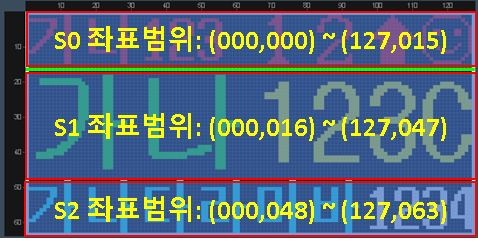
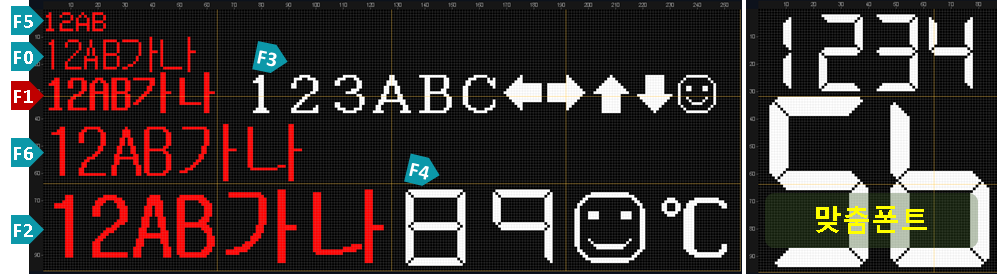
| Font | Font size (W × H pixels) | Format | ||
|---|---|---|---|---|
| Numbers/Latin | Korean | Symbols | ||
| F0 | 7×14 | 14×14 | - | Gulim thin |
| F1 | 8×16 | 16×16 | - | Gulim regular Default |
| F2 | 32×16 | 32×32 | - | Gulim regular |
| F3 | 16×16 | × | 32×32 | Wide numbers/Latin (partial), symbols/images |
| F4 | 32×32 | × | 32×32 | Wide numbers/Latin (partial), symbols/images |
| F5 | 6×8 | × | × | Mini numbers/Latin |
| F6 | 12×24 | 24×24 | - | Gulim regular |
| F7 | 14×24 | × | - | Digital numbers |
- F0/F1/F2/F6 : Numbers/Latin characters are half the width of Korean characters (half-width).
- F3/F4 : Lowercase Latin letters (a, b, c…) are mapped to special characters.
- Within one section, only fonts with the same vertical pixel size (same height) can be mixed. (E.g. "F1 & F3", "F2 & F4", "F6 & F7")
/M0
Static
Static display (default).
/M1abcd E.g. /M1, /M1320, /M16310
Move left (scroll)
a Speed: 1 (fast) – 9 (slow), 5 (default)
b Hold time: 0–9 s, 0 (default)
c Start: 0 (after current text finishes), 1 (immediately, default)
d Gap between cycles: 0 (section length), 1 (one character width, default)
/M2ab E.g. /M2, /M231
Blink
a Blink speed: 1 (0.5 s), 2 (1 s, default), … 9 (4.5 s)
b Start: 0 (after current text blinks), 1 (immediately, default)
☞ If the effect attribute is omitted, “/M0” is applied automatically. Omitted options (abcd) use their default values.
C0Clear (black)
C1Red
C2Green
C3Yellow
C4Blue
C5Pink
C6Cyan
C7White
Full-color models support
A~M (13) and a~s (19) additional colors.| Command | Format | Packet example |
|---|---|---|
| Rectangle | /r(x,y,width,height,color) | /r(0,0,127,63,C7) //white outline |
| Horizontal line | /h(x,y,width,color) | /h(0,16,127,C2) //green horizontal line |
| Vertical line | /v(x,y,height,color) | /v(31,0,63,C3) //yellow vertical line |
| Circle | /c(x,y,radius,color,fill) | /c(20,16,10,C1,1) //fill 0 = filled, 1 = outline |
| Background fill | /b(x,y,width,height,color) | /b(0,0,127,16,C4) //blue background fill |
- (x,y) is the start point in pixels (center point for circles). Do not insert spaces anywhere in a packet.
- Coordinates start at (0,0). Drawing commands outside the screen resolution are ignored.
- Drawing packets can be appended to a section text packet or sent separately.
E.g.#{S0/C1가나다/r(0,0,128,64,C7)}#,#{/r(0,0,128,64,C7)}#
Basic
Advanced
Special
"Advanced/Special" functions are available with our technical support.
| Function | Command | Description | |
|---|---|---|---|
| Clear screen | #{CF0}# | Clears the entire screen. | |
| Fill screen color | #{CFx}# | x: fills the screen with color 0 (black)–7 (white). | |
| Controller reset | #{CR}# | Reboots and shows the initial message (page 0). | |
| Brightness | #{Cbxxx}# | xxx: 000–100% (default). Saved to ROM. | |
| Background image | #{CBx}# | x: 0 (off), 1–9 shows a stored BMP background image. | |
| Save page packet | #{Px[…]}# | x: 0–9. Saves [...] to ROM (max 512B). | |
| Call page | #{Px}# | Shows a stored page. P0 is shown automatically at power-on. | |
| Page cycle | #{P(xx,y,z)}# | Repeats pages y–z every xx×0.1 s. | |
| Time sync | #{CT…}# | Sets date, weekday, and time (YYMMDDdhhnnss). E.g. #{CT2609104134229}# // “2026Y 9M 10D Thu(weekday) 13h 42m 29s” sync. | |
| Read time | #{CTI}# | Responds with the current time as #{CT…}#. | |
| Date/time display | /Ixx | Shows date and time, updated every second. | |
| Relay control | #{Crxxxyyy}# | Relay 1·2 on-time ×0.1 s (000 OFF – 999 ON). | |
| Factory reset | #{Cf}# | Restores screen settings, messages, brightness, and baud rate to defaults. | |
| Read firmware version | #{CV}# | Responds with firmware version info. E.g. #{CV_firmware type_version_release date...scan type_panel size_screen size...baud rate}# |
/I01 Year
/I02 M
/I03 D
/I04 (weekday)
/I05 AM/PM
/I06 h
/I07 m
/I08 s
#{S0/F1/C1/I01-/I02-/I03 /I04 /I05 /I06:/I07:/I08}#
→ 2026-06-19 Thu AM 10:25:42 // insert hyphens, colons, and spaces yourself
01If attributes are omitted, defaults (full size, left align, F1, M0) apply and text starts at the top-left.
02Packets are up to 512 bytes. Send one or several at once. (Serial send interval: at least 0.2 s recommended)
03Drawing commands can be sent together with text packets. E.g.) #{S0/C1가나다123/r(0,0,128,64,C7)/h(0,16,128,C2)}#
04Delimiters
E.g.) #{S0/C1((1//100))}# → LED screen: (1/100) displayed
# { } [ ] cannot be used in a string. To display the delimiter / ( ) , enter it 2 times in a row..E.g.) #{S0/C1((1//100))}# → LED screen: (1/100) displayed
05After successful processing, the controller responds with
#{XX}# , using the first 2 characters of the packet. E.g. #{S0}#, #{S1}#, #{/r}#Page packets (saved)
Real-time messages are volatile and disappear at power-off. Page packets are stored in ROM and persist after reboot;
#{P0}# is shown automatically at power-on. >>P0: text/image saved to page 0Time sync
There is no internal battery, so the time resets to 1970-01-01.
Send a sync packet at boot or periodically, or use a GPS receiver (option) for accurate time.
Background image
Store BMP background images and call them, or show them behind text. (Air quality / environment signs, etc.)
Factory reset
Restores screen settings, page messages, brightness (100%), and baud rate (115200bps) to factory defaults. JP1 Shorting these pins for 5+ seconds also resets.
LED Sign Sample Kit GD500-KIT-B
An all-in-one kit for developing or integrating an LED sign for the first time. Connect the LED panel and controller and start sending test packets right away.
View features and specs View sample images Watch sample display video
Key features
●
Color 8 colors (standard), full color (option)
●
Specs Pitch 2.5mm · 320×160mm · approx. 600cd/m² · 400g · 5V-4A
●
Resolution 128×64 (up to 4 lines · 8 Korean / 16 Latin characters per line)
Scrolling text up to 150 Korean (300 Latin) characters
●
Section split Up to 16 sections, each with its own position, font, effect, and color
●
Content Korean/Latin/special characters, outlines/lines/background fill/circles, BMP images
●
Font Multiple refined fonts at once (8+), custom fonts (option)
●
BMP image display Store images and call them directly or show them with text
●
Panel expansion Up to 3 panels horizontally or vertically (option)
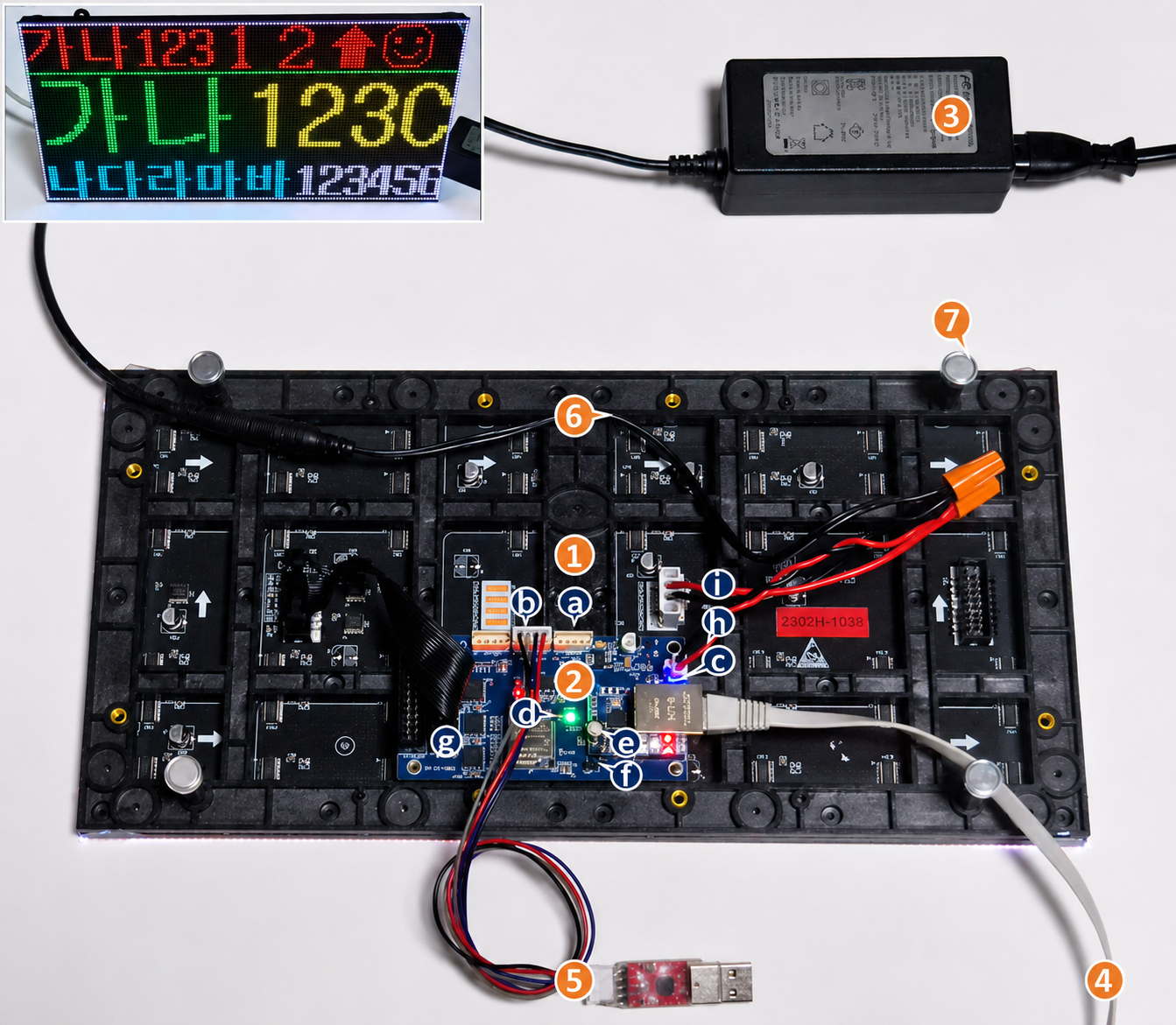
Components
①
LED panels LED-P2.5-4R8C
②
Controller GD500b
③
Adapter 220V → 5V·5A
④
LAN connector On request (1m)
⑤
USB-TTL converter On request (CP210x)
⑥
Adapter extension cable
⑦
Magnetic standoffs Height 28mm, M3, attaches to steel plates
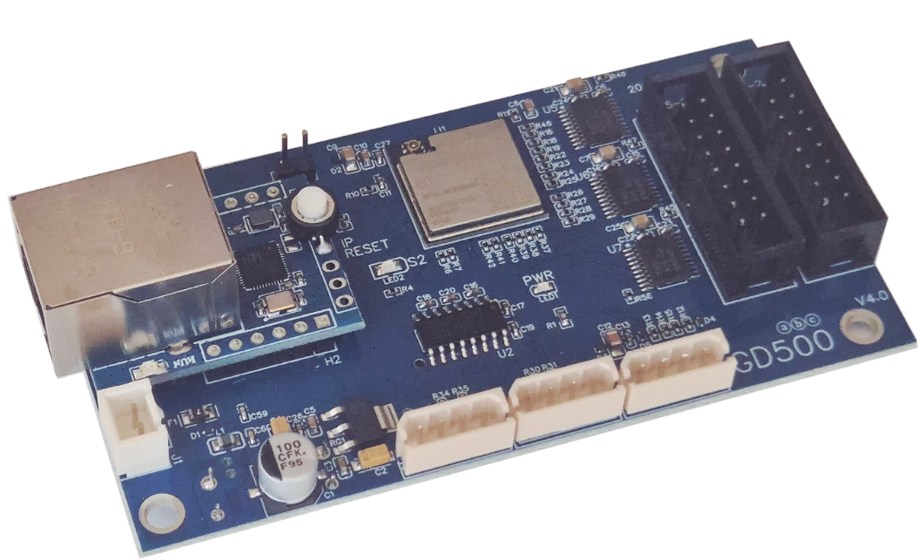
Ports · Indicators · Buttons
a
RS232 port Default 115,200bps (configurable)
b
TTL port Default 115,200bps (configurable)
c
Blue LED Blinks every 1 s — connected
d
Green LED Always on — system OK
e
White button Hold 5+ s to reset network (192.168.0.201:5000, server mode)
f
Jumper Short 5+ s for factory reset — use with technical support
g
16-pin data connector → LED panel
h
Power cable 2-pin → controller
i
Power cable 2-pin → LED panel
Initial setup and usage
A
Connect PC and LED sign
Connect the PC and LED sign with a LAN cable (or serial cable). See the ☞ GD500b spec sheet(2~3P) for details.
For LAN, set the PC's IP to 192.168.0.xxx beforehand.
B
Run GD500 Simulator (communication / screen size setup)
GD500 Simulator demo video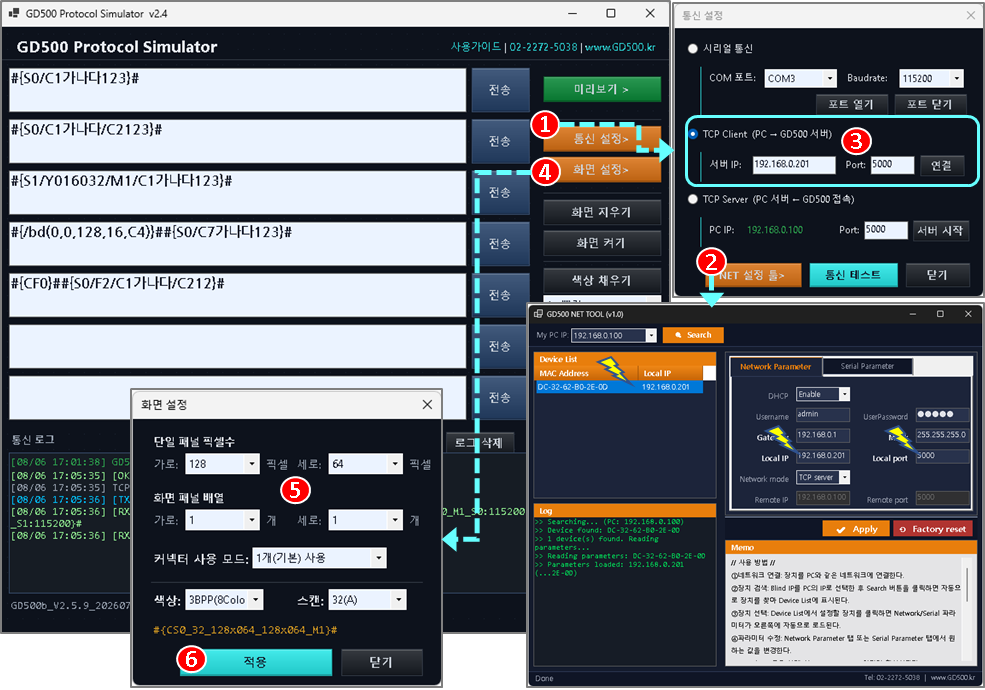
1
통신설정 (Comm. Settings) — click to open the communication settings window.
2
NET 설정 툴 (NET Tool) — click to open GD500 NET TOOL. Search for the GD500 controller and check or change its IP.
☞ See "GD500_NET_TOOL Guide" (Korean)
[Tip]
For RS232/TTL, select "시리얼 통신" (Serial), set the COM port and baud rate (default 115200bps), then click "포트 열기" (Open Port).
3
Enter the GD500 controller's IP and port, then click 연결 (Connect).E.g. 192.168.0.201, 5000 (default)
If the log window shows the message below, the connection is OK.
If the log window shows the message below, the connection is OK.
[OK] TCP Client Connected [192.168.0.201:5000]
4
Click 화면 설정 (Screen Settings) to open the screen settings window.
5
Set as follows. (contact us for technical help if needed)
| Item | Kit A (2-line) | Kit B (4-line) |
|---|---|---|
| Single panel pixels | W 96, H 32 | W 128, H 64 |
| Panel array | W 1, H 1 | W 1, H 1 |
| Connectors used | 1 (default) | 1 (default) |
| Color | 3BPP | 3BPP |
| Scan | 16(A) | 32(A) |
6
Click 적용 (Apply). Check that the log window shows the following.
[TX] #{CS0_32_128x064_128x064_M1}#
[RX] #{CS}#
[Important]
Applying screen settings resets the controller, so press "③ 연결" (Connect) again to reconnect.
C
Run GD500 Simulator (text display demo)
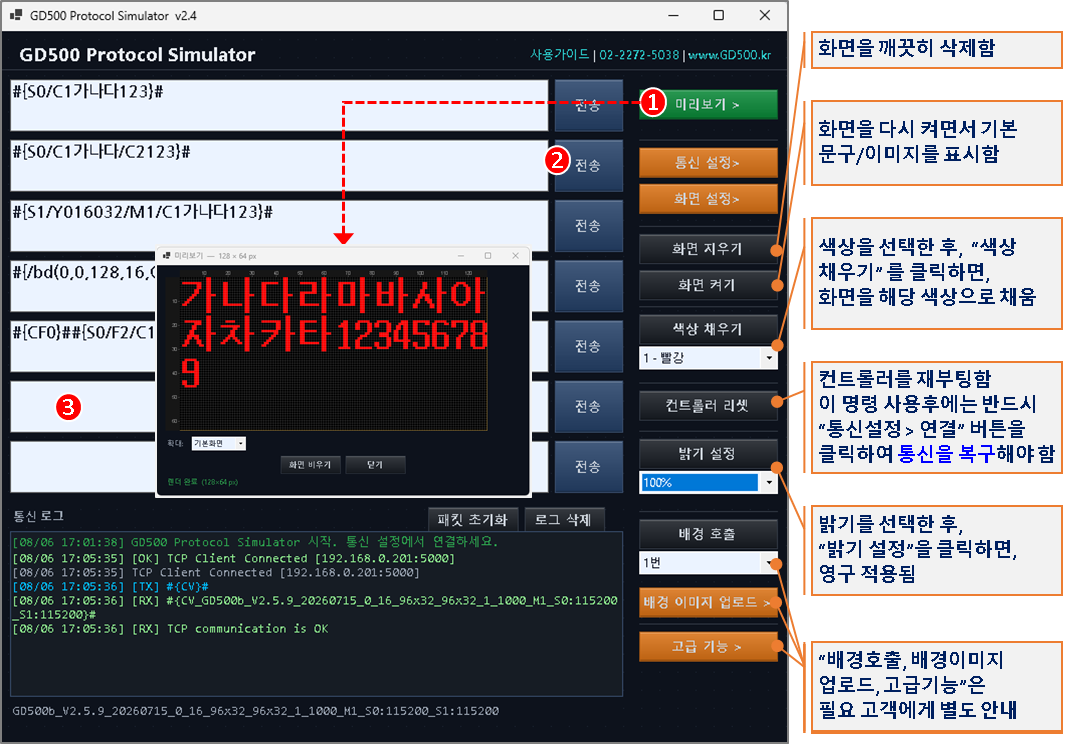
GD500 Simulator demo videoSend various packets to the preview window and the LED sign to check behavior.
1
Click "미리보기" (Preview) to open the preview window.
2
Send the test packets one by one and check how they appear in the preview window and on the LED sign.
[Tip 1]
To clear the screen, click "화면 지우기" (Clear Screen) on the right, or send the
#{CF0}# command.
[Tip 2]
"패킷초기화 (Reset Packet)" resets the text input to its default state.
[Tip 3]
Split the screen into multiple sections (up to 16) with different fonts, effects, and colors (8-color/full color).
[Tip 4]
Defaults: /X (full size), /Y (full size), /F1 font, /A0 left align, /M0 (static)
#{S0/C1가나다라마바사아자차카타123456789}# — sent without attributes, defaults apply and text fills from the top-left line to the right.Defaults: /X (full size), /Y (full size), /F1 font, /A0 left align, /M0 (static)
3
Using the GD500 protocol document, send the default packets or the sample case packets and learn how they appear and behave in the preview window or on the LED sign.
GD500 Sample Cases
In the simulator, set the screen size , then send a packet below (max 512 bytes) to see it in the preview window · on a real LED sign the colors look even better
Sample Kit A: P3 2R6C
Resolution: 96 W × 32 H pixels
Color 3BPP · Scan 1/16
1. General notice(2 sections · scroll)
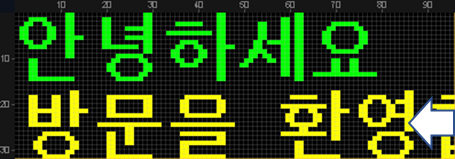
#{S0/Y000016/C2안녕하세요}# //section 0
#{S1/Y017032/M1/C3방문을 환영합니다}# //section 1
2. Environment info(3 sections · special chars · lines)
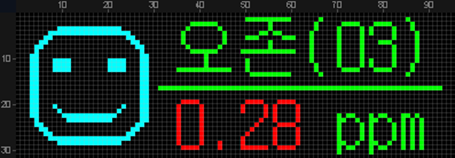
#{S0/X000032/Y000032/F4/C6e/h(31,16,62,C2)}#
#{S1/X029096/Y000016/F0/A1/C2오존(03)}#
#{S2/X029096/Y017032/F0/A1/C10.28/C2 ppm}#
3. Large number counter(1 section · large digital font)
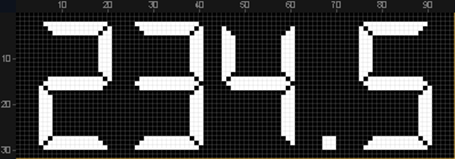
#{S0/A1/FB/C7234.5}# //FB = 7-segment
4. Parking fee(4 sections · rectangles)
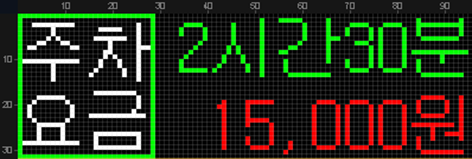
#{S0/X000032/Y001016/F0/C7주차}#
#{S1/X000032/Y016032/F0/C7요금/r(0,0,28,32,C2)}#
#{S2/X028096/Y000016/A2/F0/C22시간30분}#
#{S3/X028096/Y017032/A2/F0/C115,000원}#
5. Illegal parking warning(1 section · large text + scroll)
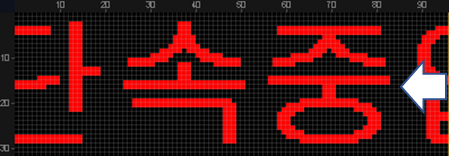
#{S0/F2/M1/C1불법주정차 단속중입니다}#
6. Parking guidance(5 sections · arrows · numbers)
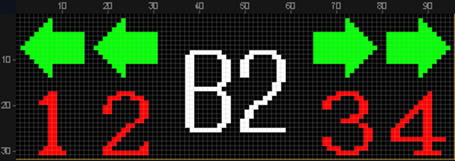
#{S0/X000032/Y000016/F3/C2aa}# //left arrow
#{S1/X000032/Y016032/F3/C112}#
#{S2/X064096/Y000016/F3/C2bb}# //right arrow
#{S3/X064096/Y016032/F3/C134}#
#{S4/X036064/Y005032/F6/C7B2}#
7. Parking gate sign(2 sections · horizontal line)
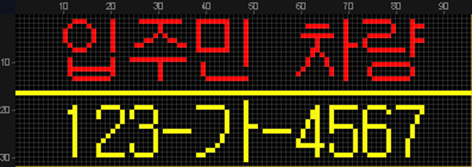
#{S0/Y000016/A1/F0/C2입주민 차량}#
#{/h(0,16,96,C3)}# //horizontal line
#{S1/Y017032/A1/F0/C7123-가-4567}#
8. Number fonts(excluding digital fonts)
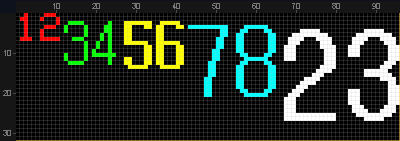
#{S0/X000011/Y000007/F5/C112}# //F5, 6x8
#{S1/X011026/Y000013/F0/C234}# //F0, 7x14
#{S2/X026042/Y000015/F1/C356}# //F1, 8x16
#{S3/X042065/Y000023/F6/C678}# //F6, 12x24
#{S4/X065096/Y000032/F2/C723}# //F2, 16x32
Sample Kit B: P2.5 4R8C
Resolution: 128 W × 64 H pixels
Color 3BPP · Scan 1/32
1. Registered vehicle(2 sections · special chars · lines)
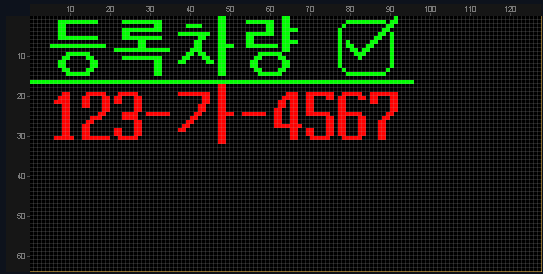
#{S0/X004096/Y000015/F1/C2등록차량 /F3s}#//special chars
#{S1/X004096/Y017032/C1123-가-4567}#
#{/h(0,16,96,C2)}# //lines
2. Bus arrival(5 sections · lines/area fill)
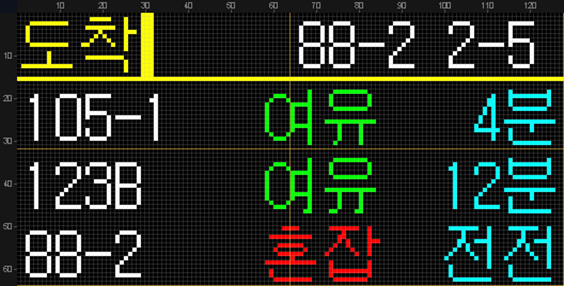
#{S0/X000034/Y000014/F0/C3도착/h(0,15,128,C3)/b(29,0,3,16,C3)}#
#{S1/X034128/Y000014/A2/M0/F0/C788-2 2-5 }#
#{S2/X001128/Y017031/F0/C7105-1 /C2여유 /C64분}#
#{S3/X001128/Y033046/F0/C7123B /C2여유 /C612분}#
#{S4/X001128/Y049064/F0/C788-2 /C1혼잡 /C6전전}#
3. Parking availability(5 sections · arrows · alignment · large digital font)
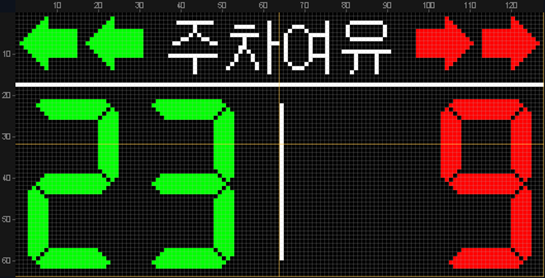
#{S0/X000032/Y000016/F3/C2aa}# //symbol (◀)
#{S1/X032096/Y001016/A1/F0/C7주차여유}# //center
#{S2/X096128/Y000016/F3/C1bb}# //symbol (▶)
#{/h(0,17,128,C7)/v(64,22,38,C7)}# //horizontal + vertical line
#{S3/X000064/Y021064/A0/F9/C223}# //left align
#{S4/X064128/Y021064/A2/F9/C19}# //right align
4. Alarm status(4 sections · scroll effect)
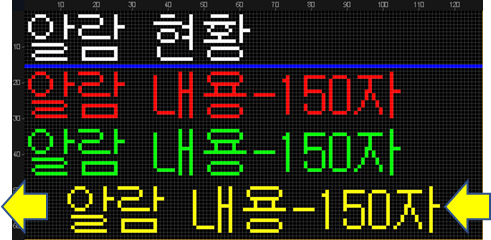
#{S0/Y000014/F0/C7Alarm status/h(0,15,128,C4)}#
#{S1/Y016030/M0/F0/C1알람 내용-150자}#
#{S2/Y032046/M0/F0/C2알람 내용-150자}#
#{S3/Y048062/M1/F0/C3알람 내용-150자}# //scroll
5. Scoreboard(6 sections · alignment · various fonts)
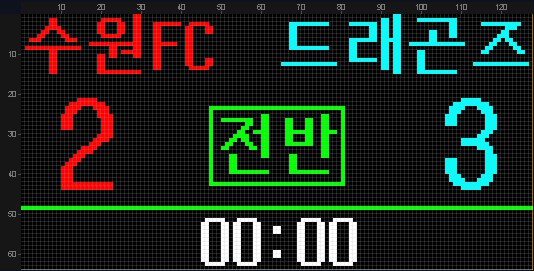
#{S0/X000064/Y000016/A0/F1/C1수원FC}# //left align
#{S1/X064128/Y000016/A2/F1/C6드래곤즈}# //right align
#{S2/X008040/Y017048/A0/F2/C12}# //left align
#{S3/X088120/Y017048/A2/F2/C63}# //right align
#{S4/X048080/Y025041/F1/C2전반}#
#{S5/X044084/Y049064/A0/F1/C700:00}# //center
#{/r(47,23,34,20,C2)/h(0,48,128,C2)}# //rectangle, horizontal line
6. Chemical tank level(3 sections · drawing · fill · graph)
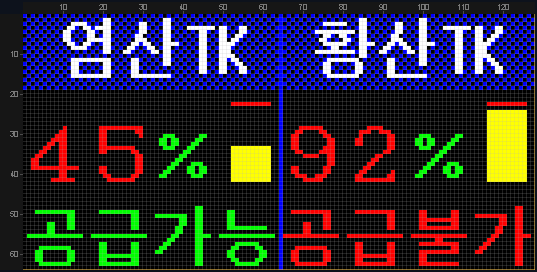
#{/bd(0,0,128,19,CD)/v(64,0,64,C4)/h(52,22,10,C1)/h(116,22,10,C1)}#
#{S0/Y001017/C7 염산TK 황산TK}#
#{S1/X000128/Y027043/F3/C145/C2% /C192/C2%}#
#{S2/Y048064/C2공급가능/C1공급불가}#
#{/b(52,33,10,9,C3)/b(116,24,10,18,C3)}# //graph
7. Live date/clock(2 sections · large font)
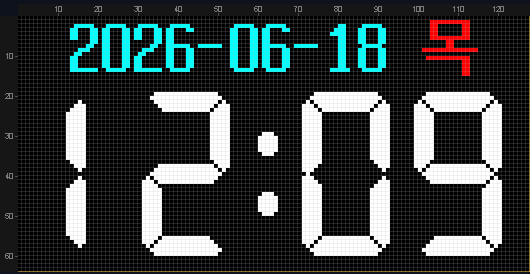
#{S0/Y000014/F1/A1/C6/I01-/I02-/I03 /C1/I04}#
#{S1/Y019064/F9/C7/I06:/I07}# //large digital font
8. Special characters(F3/F4 lowercase Latin)
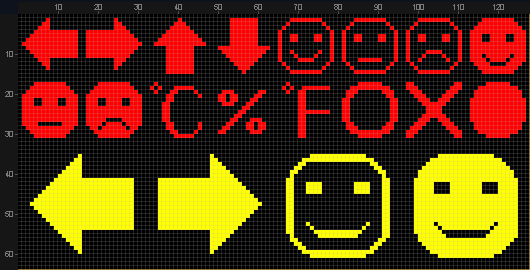
#{S0/Y000032/F3/C1abcdefghijklmpqr}#
#{S1/Y032064/F4/C3abeh}#
9. Drawing sample(lines, circles, rectangles, fill)
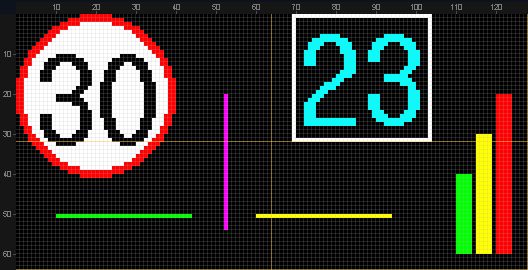
#{/c(20,20,20,C1,1)/c(20,20,18,C7,1)}#
#{S0/X004040/Y006040/F2/C030}#
#{S1/X070112/Y001015/F2/C623}#
#{/r(69,0,35,32,C7)}#
#{/h(10,50,34,C2)/h(60,50,34,C3)/v(52,20,34,C5)}#
#{/b(110,40,4,20,C2)/b(115,30,4,30,C3)/b(120,20,4,40,C1)}#
Drawing commands
- Rectangle:
/r(x start, y start, width, height, color) - Horizontal line:
/h(x start, y start, width, color) - Vertical line:
/v(x start, y start, height, color) - Circle:
/c(x center, y center, radius, color, option)☞ Fill option: 0 = filled, 1 = not filled - Background fill:
/b(x start, y start, width, height, color)
*Color codes: C1-Red, C2-Green, C3-Yellow, C4-Blue, C5-Pink, C6-Cyan, C7-White, C0-Black
Resources
GD500 Protocol Document
Full packet structure, special commands, and notes (7p)
GD500 Simulator
PC program for previewing LED display output from packets
GD500 NET TOOL
Finds the controller IP/port and configures the network
Technical documents
- 01 GD500 spec sheet
- 02 GD500 optional parts (coming soon)
- 03 Compatible LED panels for GD500 (spec sheets)
- 04 GD500 sample kit spec sheets: GD500-KIT-A GD500-KIT-B
Information & Contact
FAQ
Q1. How does the first consultation work?+
Call us and we will go over the best way to build your LED sign (screen size, communication method, basic wiring/setup, demo packets, related software/documents, rough cost), with a remote demo if needed.
Q2. Can it display full-color images?+
Make the image as a BMP sized to your LED screen (Paint, Photoshop, etc.) and send it to us. Up to 9 images can be stored and shown with a simple call packet, or used as a background behind messages. E.g. air-quality signs, full-color bus stop signs.
Send us a quick sketch or screenshot and we will explain how to build it.
Q3. Can it display messages if our device uses a different protocol?+
If you can't send data in the GD500 protocol format, send us your device's protocol document or a test unit. We will analyze it and match the protocol so your messages can be displayed.
Q4. Does the content disappear when power is off?+
Real-time messages are volatile. Send them as
#{Px[real-time message packet}# page messages (x=0~9 pages) and they are stored in the built-in ROM, shown automatically after reboot (page x=0), or repeated in order. Contact us for details.Q5. The time resets to 1970.+
There is no internal battery, so the time resets on reset. At boot or periodically, send a
#{CT…}# sync packet, or use a GPS time receiver (option).Remote technical support
Open the simulator and tell us your AnyDesk number. Remote support takes about 5 minutes.
TEL
{{ phone }}EMAIL
{{ email }}